How to manage Webshop customer accounts
In this article, we'll guide you through managing customer accounts in your Webshop.
The customer account section enables you to update customer information, manage orders and passwords, and set standing discounts.
Step 1
In the website editor, go to the 'Webshop' tab.
Step 2
Select 'Customer accounts'.
Step 3
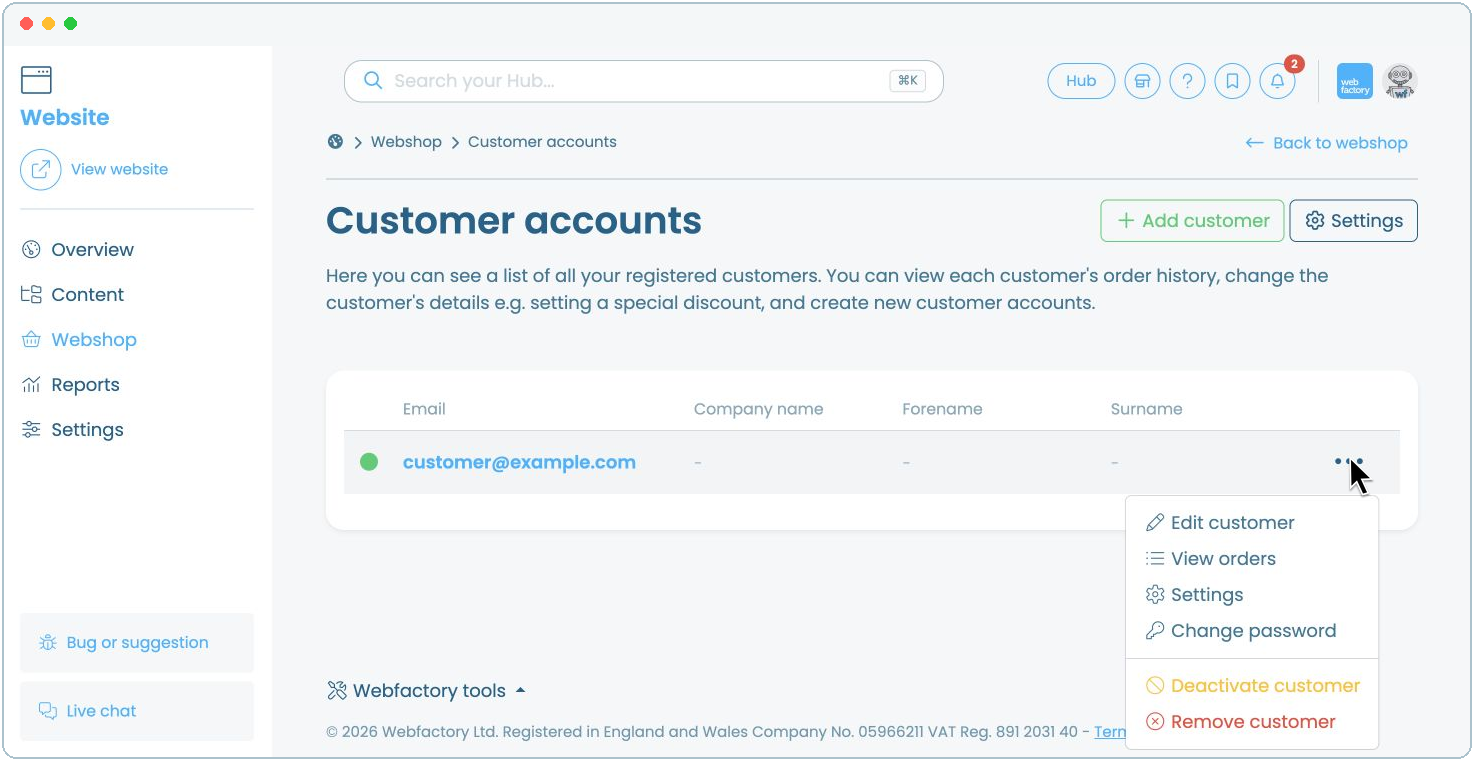
Select the customer's email address to open their account or click on the icon next to it.
You can manage the customer account in these tabs:
- Edit customer: update the customer's details.
- View orders: view and manage the customer's orders.
- Settings: set a standing discount.
- Change password: set a new password for the customer.
Related articles
- How to add a first-order discount for newly created customer accounts
- How to change customer order statuses
- How to deactivate or remove a Webshop customer account
- How to enable customer accounts
- How to require activation of new customer accounts
- How to set a standing discount for a specific customer account
- How to set up a default account discount for all your customers
- Introduction to customer accounts settings