How to add subpages
In this article, we'll guide you through the steps of adding subpages to your site.
You can find out more about subpages in our support article what are subpages. If you'd like to add a parent page, read our support article on how to add a page.
How to add a subpage
Step 1
In the website editor, go to the 'Content' tab.
Step 2
Then, click on the 'Pages' section.
Step 3
Click the ' Add page button'.
Step 4
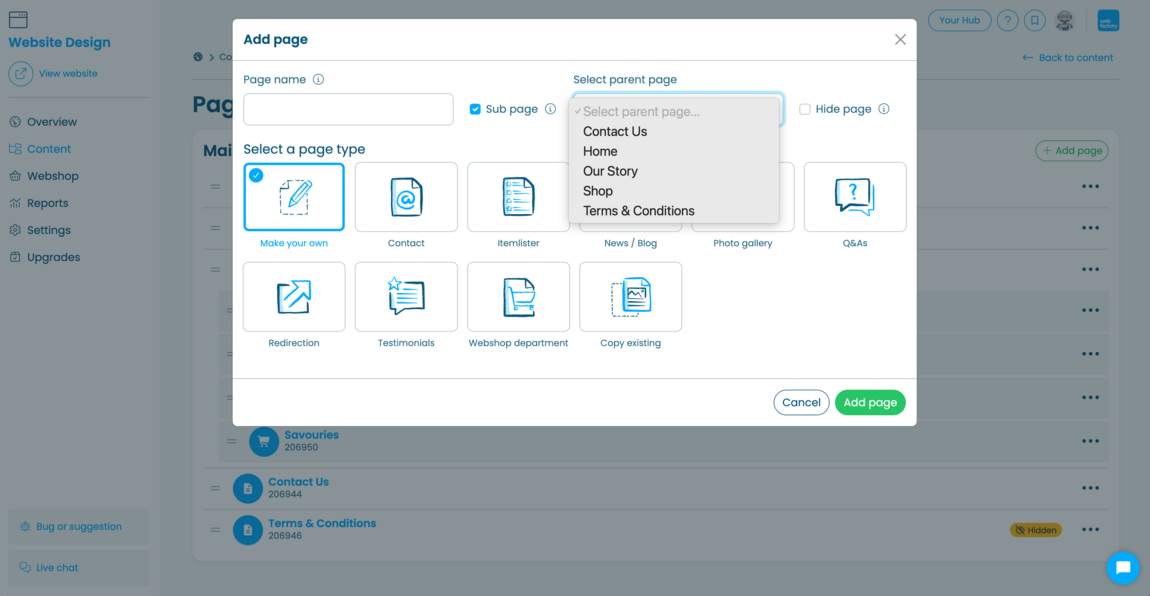
In the pop-up window, enter your 'Page name'.
Step 5
Tick the 'Sub page checkbox'.
Step 6
Choose a parent page from the dropdown list (e.g. Shop).
Step 7
Select your desired 'Page type' (e.g. Make your own, Contact or News/Blog).
Step 8
Click 'Add page' to save it.
Related articles
- How to add or remove pages from your website
- How to add new content on your website pages
- How to copy your pages
- How to hide a page
- How to hide subpages in desktop navigation
- How to hide subpages in mobile navigation
- How to link internal pages together
- How to rearrange or modify section elements on your web pages
- Introduction to page sections
- Introduction to page settings
- Introduction to page types
- What are subpages?